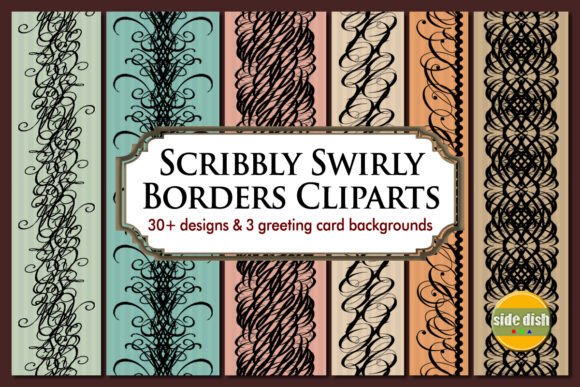
Scribbly Swirly Borders Cliparts for Creative Design Projects
Looking for a versatile and playful design element to elevate your creative work? Scribbly Swirly Borders Cliparts offer a fun, flexible solution for a wide variety of digital and print projects. These hand-drawn, whimsical borders bring a unique charm to designs and can be customized to suit your specific needs.
What Makes Scribbly Swirly Borders Cliparts Unique?
This digital clipart set contains 32 distinct designs that resemble hand-drawn scribbles with elegant, swirly patterns. Each border is created in high-resolution PNG format (300 dpi) with a transparent background, making them easy to layer and integrate into your artwork. The seamless design allows for smooth tiling, whether you're using them as a background or a foreground accent.
With lengths up to 4200 pixels and widths ranging from 171 to 776 pixels, these borders are ideal for both large-scale and small-format designs. Whether you're creating a digital layout or preparing a print product, the flexibility of these cliparts ensures they fit seamlessly into your workflow.
Why Designers Love These Cliparts
One of the biggest appeals of Scribbly Swirly Borders Cliparts is their adaptability. You can mix and match different borders, resize or rotate them, and even apply custom colors or patterns. This makes them perfect for both beginners and experienced designers who want to add a personal touch to their work without starting from scratch.
- Customizable – easily edit and style to match your theme
- Versatile – works in both digital and print formats
- High quality – crisp, clean lines at 300 dpi resolution
- Transparent background – effortless integration into any design
Where Can You Use These Borders?
These cliparts are great for a wide range of creative applications. Whether you're crafting invitations, designing a website, or making personalized stickers, Scribbly Swirly Borders Cliparts can help you achieve a polished, professional look with minimal effort.
- Invitations and Greeting Cards – Use the included 8x8 or 6.25x4.5 card backgrounds as a base and add borders for a custom feel.
- Scrapbooks and Junk Journals – Add visual interest and structure to your pages with playful, hand-drawn frames.
- Web Design and Social Media Graphics – Use borders to highlight sections of a webpage or create engaging Instagram posts.
- Stickers and Sublimation Products – These cliparts are perfect for creating custom stickers, mugs, or apparel with a handmade aesthetic.
- Educational Materials – Teachers and educators can use these borders to make worksheets, flashcards, or presentations more visually engaging.
Getting the Most from Your Clipart Set
While the cliparts are ready to use right out of the box, a graphic editing app or software like Photoshop, Canva, or Illustrator can help you unlock even more creative possibilities. You can layer multiple borders, recolor them to match your palette, or combine them with other design elements to create something truly unique.
The included PDF content list makes it easy to preview all 32 designs, so you can quickly find the right border for your project. Whether you're working on a digital layout or preparing for print, this organized guide ensures you never miss a design option.
Who Can Benefit from These Cliparts?
Scribbly Swirly Borders Cliparts cater to a broad audience, from hobbyists and crafters to small business owners and professional designers. If you're looking for an easy way to add personality and structure to your projects, these cliparts are a great investment.
- Beginners – No design experience needed. Just drag, drop, and customize.
- Bloggers and Marketers – Enhance your social media visuals, blog headers, and promotional materials.
- Entrepreneurs – Create branded stickers, packaging, or marketing materials with a creative edge.
- Educators – Make learning materials more engaging with colorful, themed borders.
- Freelancers – Speed up your workflow with ready-to-use design elements that can be tailored to client needs.
Important Considerations Before Use
Before diving into your next design project, keep a few things in mind. First, ensure you have the right software to edit and manipulate the PNG files. While many platforms support PNG files, using a dedicated graphic design tool will give you the most flexibility.
Also, remember that while these cliparts are royalty-free for many uses, it’s always a good idea to double-check the licensing terms provided by the creator. This is especially important if you plan to use them in commercial products or large-scale distribution.
Let Your Creativity Shine
Whether you're making a birthday card or designing a digital layout for a client, Scribbly Swirly Borders Cliparts offer a fun and functional way to enhance your work. Their hand-drawn style adds a personal, artistic touch that stands out from generic design elements. With 32 options to choose from and endless customization possibilities, you’ll never run out of ways to use them.
So go ahead—download the set, experiment with different layouts, and discover how these playful borders can transform your creative projects. You might just find a new favorite design tool in the process.